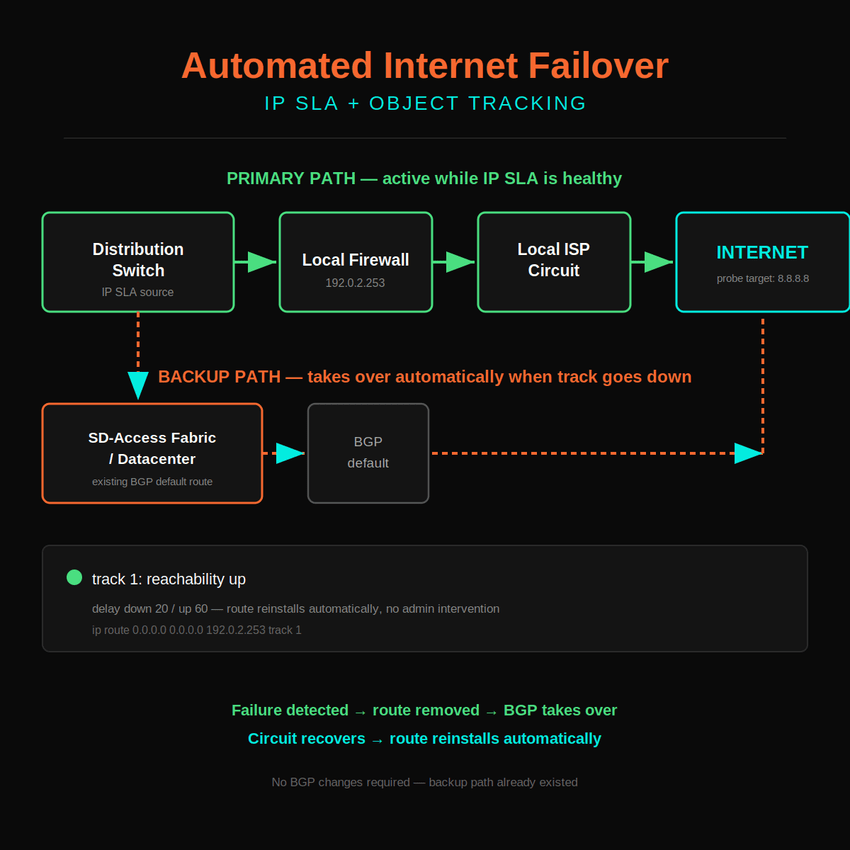
The Scenario
A distribution switch has a static default route pointing at a local firewall:
ip route 0.0.0.0 0.0.0.0 192.0.2.253Under normal conditions, that route sends internet-bound traffic straight to the firewall, which hands it off to the ISP. Simple, and it works.
Now the ISP circuit behind that firewall goes down. The firewall itself is still powered on and still answering pings on its inside interface, so as far as the switch can tell, nothing is wrong. The static route stays installed. Traffic keeps getting forwarded to a next hop that no longer has anywhere to send it, and it just blackholes.
This is the core problem: next hop reachability isn’t the same thing as end to end reachability. A route that only checks “can I reach the firewall” has no idea the firewall’s internet connection is dead.
So the question becomes: every time this happens, do you want to be the one who gets paged, logs in, and manually runs no ip route 0.0.0.0 0.0.0.0 192.0.2.253 to force the switch onto its backup path, then manually puts the route back once the circuit recovers? Or do you make the switch do that job itself?
This is how you automate it.
The Fix: IP SLA + Object Tracking
Three pieces, all native IOS:
- IP SLA — sends continuous ICMP probes to a real internet destination (8.8.8.8 works fine), so you’re testing the actual path, not just the first hop.
- Object Tracking — watches the SLA result and flips a track object up or down based on it.
- An existing backup route — in this setup, a BGP-learned default was already present, so no floating static route was needed. Once the tracked route is pulled, BGP takes over automatically.
Final config:
ip sla 1
 icmp-echo 8.8.8.8 source-interface Vlan10
 frequency 5
ip sla schedule 1 life forever start-time now
!
track 1 ip sla 1 reachability
 delay down 20 up 60
!
ip route 0.0.0.0 0.0.0.0 192.0.2.253 track 1
Deployment order matters here: configure and schedule the SLA first, create the track object, then attach track 1 to the static route. Attaching the track before the SLA is scheduled means the route gets evaluated against an object that has no data yet.
Where the Config Actually Comes From
Every line above maps to a specific job:
icmp-echo 8.8.8.8 source-interface Vlan10— this is the probe. Source interface matters more than people expect (more on that below). It needs to be an SVI that’s actually up, on the subnet that reaches the firewall.frequency 5— probe interval. 5 seconds is frequent enough to catch a real outage fast without hammering the destination.track 1 ip sla 1 reachability— ties a track object to the SLA’s pass/fail state. This is the thing the route actually watches.delay down 20 up 60— asymmetric timers on purpose. 20 seconds of continuous failure before pulling the route, so a single dropped ping doesn’t trigger a failover. 60 seconds of continuous success before restoring it, so a flaky, half-recovered circuit doesn’t cause the route to flap.ip route ... track 1— the route itself, now conditional on the track object instead of unconditional.
The Lesson Worth Remembering
The first attempt at this didn’t work, not because IP SLA is unreliable, but because of a wrong source interface. The SLA was pointed at a VLAN interface that turned out to be down and unassigned:
show ip interface brief | include Vlan
Vlan95   unassigned   YES unset   down   down
A manual test confirmed it immediately:
ping 8.8.8.8 source vlan 95
% Invalid source interface - IP not enabled or interface is down
IP SLA statistics showed the same thing — 100% timeouts, track object stuck down, route never reinstalling — even though the actual internet path was completely fine.
The fix was just picking the correct interface. The firewall’s next hop lived on .253, and the switch’s own SVI on that same subnet was .254, so that was the right source:
Vlan10 192.0.2.254 YES NVRAM up upTakeaway: if a track object won’t come up and the internet path itself looks healthy, check the SLA’s source interface before anything else. show ip interface brief | include Vlan plus a manual ping <destination> source <interface> will tell you in ten seconds whether the interface is the actual problem.
The Second Lesson: The Probe Was Riding the Route It Was Testing
Live for a few days, this started flapping. The static route would get pulled, come back roughly a minute later, then get pulled again, in a loop, even though the ISP circuit behind it was still actually down.
The cause wasn’t the SLA or the track object. It was that the probe’s own traffic was never insulated from the routing decision it exists to inform. Once track 1 goes down and pulls the static route, the only default route left in the table is the BGP backup, so the SLA’s icmp-echo starts riding that backup path too. The probe succeeds, track 1 comes back up after its 60 second up-delay, the static route reinstalls, and the next probe rides that route straight back into the still-dead circuit. Fail, recover, fail, recover, indefinitely.
A tracked route that also carries the traffic used to test it will eventually test itself into a loop. The probe has to leave by a fixed path regardless of what the tracked route is currently doing.
ip local policy route-map is the tool for this. It only affects traffic the router itself originates, never anything transiting the switch, so it can force the SLA probe out a fixed next hop no matter what track 1 is doing to the static route:
ip access-list extended IP-SLA-PROBE
 permit icmp host 192.0.2.254 host 8.8.8.8 echo
!
route-map IP-SLA-PROBE permit 10
 match ip address IP-SLA-PROBE
 set ip next-hop 198.51.100.1
!
ip local policy route-map IP-SLA-PROBE
192.0.2.254 is the same Vlan10 SVI the probe already sources from. 198.51.100.1 stands in for the real backup next hop, in the same documentation-range convention as the rest of this post — substitute the actual one. The ACL matches only the probe’s own echo traffic; the extended ACL’s implicit deny at the end means everything else, including any other host pinging 8.8.8.8 through the switch, falls out of the route-map and keeps following the normal routing table untouched.
One easy mistake here: ip local policy route-map is not the same thing as ip policy route-map applied under an interface. The interface version policy-routes transit traffic and would have created a much bigger problem than the one being fixed. Local policy only ever touches traffic the router itself generates.
Validation and Rollback
Quick reference for confirming it’s working:
show ip sla statistics 1     ! Latest operation return code: OK = healthy
show track 1                 ! Reachability is Up = healthy
show ip route 0.0.0.0        ! confirms which route is currently active
show route-map IP-SLA-PROBE  ! rising match count confirms the probe is hitting the policy
show ip local policy         ! confirms the local policy route-map is attached
And if you ever need to remove the automation and go back to a plain static route:
no ip local policy route-map IP-SLA-PROBE
no route-map IP-SLA-PROBE permit 10
no ip access-list extended IP-SLA-PROBE
no ip route 0.0.0.0 0.0.0.0 192.0.2.253 track 1
ip route 0.0.0.0 0.0.0.0 192.0.2.253
no track 1
no ip sla schedule 1
no ip sla 1
write memory
Result
- Healthy: traffic rides the tracked static route through the local firewall.
- Failure: the SLA fails, the track object goes down after the delay timer, the static route is pulled, and the existing backup route takes over — no one has to touch the switch.
- Recovery: the SLA succeeds again, the track object waits out the up-delay, the static route reinstalls, and traffic returns to the local path on its own.
No BGP changes required anywhere in this — the backup path already existed. IP SLA and object tracking just made the switch smart enough to use it automatically instead of waiting on someone to notice and fix it by hand.

